Activate for nonprofit and civic programs
Organize your voter mobilization team
Bring your permitted contact list and volunteers together. Give your nonprofit, civic or community team a clear way to organize nonpartisan voter contact and review what happened.
Create a free account, then create a campaign from your dashboard and choose the organization option. Name your program and set its start and end dates. Core field work does not require texting registration.
Set up your organization program
Each step uses screens that exist in Activate today. Nothing here asks you to describe a candidate, an office or a political committee.
Create your free account
Sign up with your email. No credit card is required, and every verified account receives 25 free Credits once.
Choose the organization option
Create a campaign from your dashboard. If Activate asks what kind of work it is, choose Political campaigns. When it asks who the field program is for, choose an organization and enter its name. Organization programs skip the candidate and office questions.
Set the program dates
Choose when the program starts and its last day. You can change the dates later in Campaign Settings.
Bring your own permitted list
Upload a contact list your organization is allowed to use for this program: CSV, Excel, delimited text or a ZIP of supported tables. Review the preview and the cost in Credits before you confirm.
Write your field question
The last step of creating an organization program asks for your field question. Write the one question your program needs answered, then agree as a team on what Yes and No mean. You can edit it later in Campaign Settings.
Invite your team
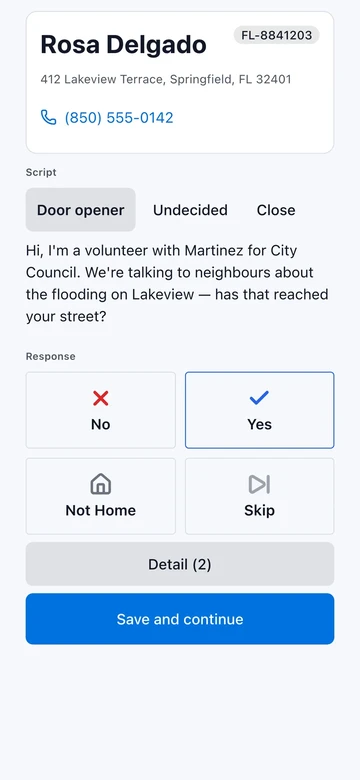
Share the QR code or link. Volunteers join in the browser, open their assignments and record Yes, No, Not Home or Skip, with notes when context helps.
One list. A shared plan for the shift.
Start with a list you can use
Confirm that your list is permitted for your program's intended use. Prepare contact details and addresses, then review the import preview and cost before confirming. Activate does not grant permission to use a voter file or determine who is eligible to vote.
Explore voter-data guidance →Give volunteers clear assignments
Invite your team with a QR code or link. Group work by location and address, then split assignments across volunteers. Before the shift, agree on the script and what each standard response means. Volunteers can use Activate in English or Spanish.
See team invitations →Keep contact responses clear
Volunteers follow the script and capture standard Yes, No, Not Home or Skip responses, with notes for context. Agree on the question before the shift so Yes means the same thing across your team.
See canvassing controls →Review the shift and hand off the next one
Use the manager dashboard to review recorded field activity and remaining assignments. Export campaign data as CSV, review notes and prepare the handoff for your next volunteer shift.
Explore the manager dashboard →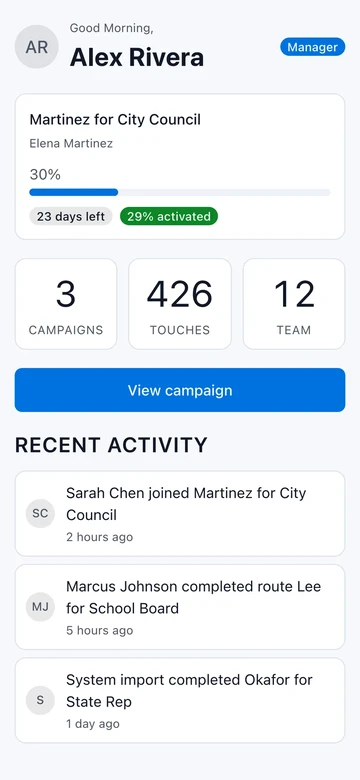
Example screen in English. Fictional campaign.
A field workflow for your program
Nonprofit and civic teams
A program coordinator can prepare a permitted list, agree on a voter-contact script and invite volunteers for the next shift. Keep the question consistent so the responses mean the same thing when the team reviews them.
Community organizations
A volunteer coordinator can split assignments and review what the previous shift recorded before handing off work. Keep your organization's program name and schedule alongside the field activity.
Community-health civic programs
Coordinate civic outreach volunteers with a permitted voter-contact list, a shared script and clear assignments. Keep this program separate from care delivery, and keep patient information and clinical records out of Activate.
Free core field work. Costs before confirmation.
Route creation, door canvassing and phone banking are free. The first 5,000 records of each import are stored free; file preparation and other metered uses can cost Credits. Buy Credits once as needed and see costs before you confirm. No subscriptions or per-seat fees.
Read the pricing boundaries →Plan your list import
Your organization brings a list it has permission to use. Adjust the list size to estimate one import.
Choose 0–100,000 records. For a larger list, talk through your requirements with us.
Rounded import estimate · USD
$10Suggested Credit load: 10 Credits
For 5,000 records in one import.
The first 5,000 records of each import are stored free. Preparing the file can still use Credits. Creating routes, visiting doors and making phone calls are free.
This is an estimate, not a quote. The app shows the exact cost before you confirm. Purchases of Credits round up to the next available pack; unused Credits stay in your account. Each verified account gets 25 free Credits once, which can cover eligible import costs before you need to buy more.
Start your programCreate your program from your dashboard, then review the quote for your file before confirming. No purchase required to start.
Texting for your program opens after a short review by us. Until then nothing can send and nothing is charged. Once it opens, your program texts only people who gave your organization permission, and texts use purchased Credits. Texting for candidates and registered committees is a separate path with its own carrier registration, including Campaign Verify.
Before your first shift
When does the program finish?
Choose the last day of your field program. The program archives once that date is more than seven days past. Archived programs can be restored for 30 days before permanent deletion; export anything you need to keep.
What work are you coordinating?
Plan the contact list, volunteer team and assignments for your program. If your program needs something Activate does not do yet, such as texting or a multi-question form, tell us through the contact page before you set up.
What will your team record?
Activate records standard contact responses and notes, not custom questionnaires or registration forms. A logged Yes is an answer to your script's question, not verified registration or turnout.
Make the next volunteer shift clear
Set up your organization program, prepare your list and invite the people doing the work.